Remove filler words from video, cleanly
Cutting every “uh” and “um” sounds simple. Done carelessly, it leaves clipped words and jumpy audio, which is worse than the filler. EditBots removes fillers like a careful editor: only when the cut is clean, and always with a reason you can see.
How it decides what to cut
- Fillers and stumbles. It finds the “uh”s, “um”s and false starts in your recording.
- Only clean cuts. A filler is removed only when both edges of the cut land in quiet audio. If an “uh” can't be cut cleanly, it stays, and EditBots tells you why.
- Retakes. If you said the same line several times, it keeps your last complete take and removes the rest.
- You check it. You see a 30-second proof edit on your own footage and the full list of cuts. Bring any of them back in plain words.
- It learns. Bring back an “uh” or keep a pause longer, and EditBots learns a rule for your next video. You can read every rule and switch it off.
A real example
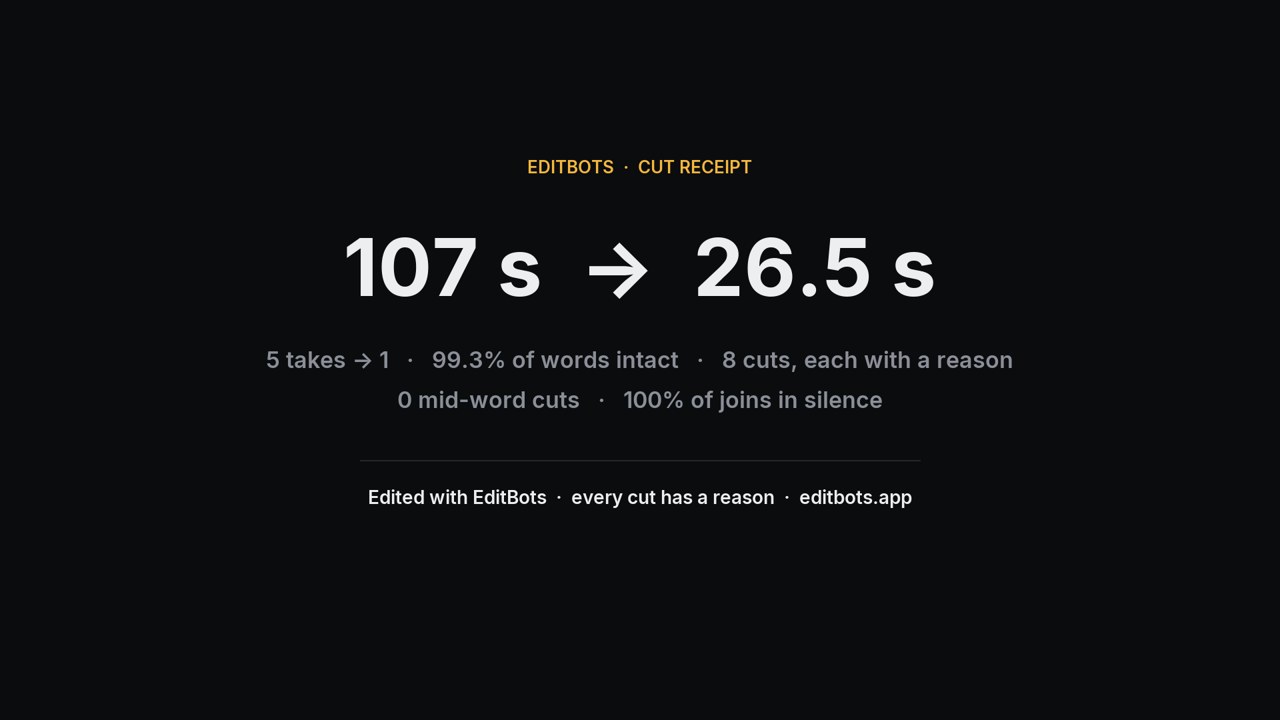
A 107-second talking-head recording with the same lines said five times became a 26.5-second clean cut that kept only the final take.
Why it doesn't cut every single filler
Removing every “uh” at any cost gives you jump cuts and a speaker who sounds like a robot. A good editor keeps some breathing room, keeps a filler that can't be cut cleanly, and never clips a word. You decide how tight the cut should be, and EditBots shows you the result before anything is final.
Long pauses get the same careful treatment. See how EditBots removes silence from video.
Questions
Is it free? Your first video is free with every feature (the export carries a small “Edited with EditBots” line). After that it's $49 once, with no subscription.
Is my video uploaded? No. Cutting, rendering and transcription run on your computer. Claude sees only the transcript text and a few still frames.
Can I finish in Premiere Pro or DaVinci Resolve? Yes. The clean cut goes over as a timeline on your original files, with a marker at every cut explaining it.